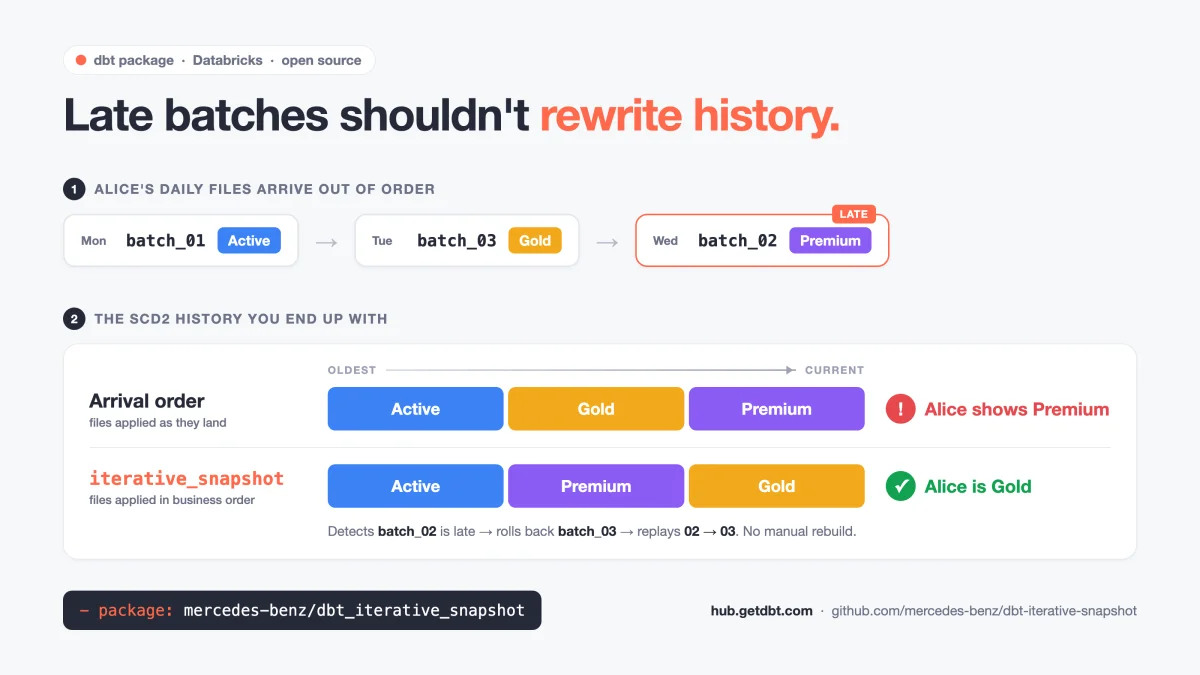
Standard dbt snapshots record history in the order your data arrives. When your source is a stream of daily files and one of them lands late, the history is built in the wrong order — and nothing fails. dbt-iterative-snapshot is an open-source dbt materialization for Databricks that applies batches in business order and repairs the history on its own when a late batch shows up.
The bug that never throws an error
It’s Monday morning and a stakeholder pings you:
“Why does the dashboard say Alice is a Premium customer? She upgraded to Gold last week.”
You check the pipeline. Every run is green. You check the source system. Alice is Gold. Then you open the history table, and it tells a story that never happened: Alice went from Active to Gold, and then back to Premium.
Nobody broke anything. No test failed. One daily file simply arrived a day late, and the SCD2 history was built in the order the files landed rather than the order things actually happened.
That is the uncomfortable part. Most data bugs announce themselves — a failed run, a null where there shouldn’t be one, a row count that drops to zero. This one doesn’t. The table has the right columns, the right keys and plausible values. It is just wrong, and it stays wrong until a human notices.
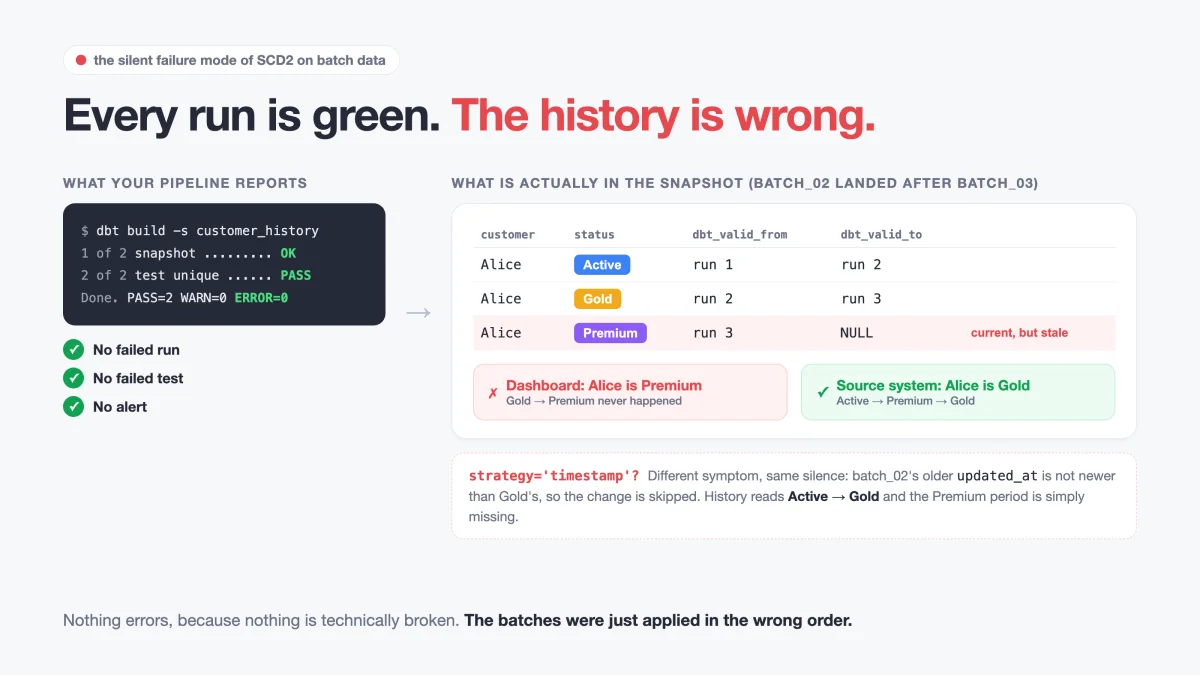
Left: what your orchestrator sees. Right: what is actually in the table. The bottom panel shows the second failure mode — with strategy='timestamp', the late change is not misplaced but silently dropped.
If your history tables feed point-in-time reporting, audits, finance reconciliations or ML training sets, this is not a cosmetic issue. Every downstream “as of” question inherits the wrong answer.
Why dbt snapshots behave this way
To be clear: dbt snapshot is one of the best features in dbt, and it does exactly what it was designed for. Point it at a table, run it on a schedule, and you get a full SCD Type 2 history with dbt_valid_from and dbt_valid_to.
The design assumption is a live source table. Each run looks at the table’s current state, compares it with the last snapshot and records the difference. “Now” is always the newest truth, so arrival order and business order are the same thing.
A lot of data platforms don’t have live tables, though. They have batches:
- a daily export file from an HR, ERP or CRM system
- CDC files landing in cloud storage
- a nightly API sync that writes a full extract
- weekly files a partner drops on SFTP
Each batch is a picture of the source at a point in time. And batches do not reliably arrive in order. An upstream job fails and is re-run tomorrow. A file is re-delivered. Someone backfills last week. The moment arrival order and business order diverge, a snapshot that only knows “now” builds history in the wrong sequence.
Here is Alice across three daily files:
batch_01 (Mon)  ->  Alice: Active
batch_02 (Tue)  ->  Alice: Premium
batch_03 (Wed)  ->  Alice: Gold
Tuesday’s file is delayed and lands after Wednesday’s. What happens next depends on your snapshot strategy — and both outcomes are silent:
| Strategy | What dbt does with the late batch | Resulting history | Visible error? |
|---|---|---|---|
check | Sees status changed from Gold to Premium, closes Gold, inserts Premium as current | Active -> Gold -> Premium (current) | None |
timestamp | Sees batch_02’s updated_at is older than Gold’s, treats it as “no change” | Active -> Gold — Premium period missing | None |
| What actually happened | — | Active -> Premium -> Gold (current) | — |
With check, the current value is wrong. With timestamp, the current value is right but a whole period of history has vanished. Neither raises anything.
Swap the customer tier for something with consequences and it stops being abstract. Here’s the same mechanism on employee data, where a late file turns a promotion into a recorded demotion:
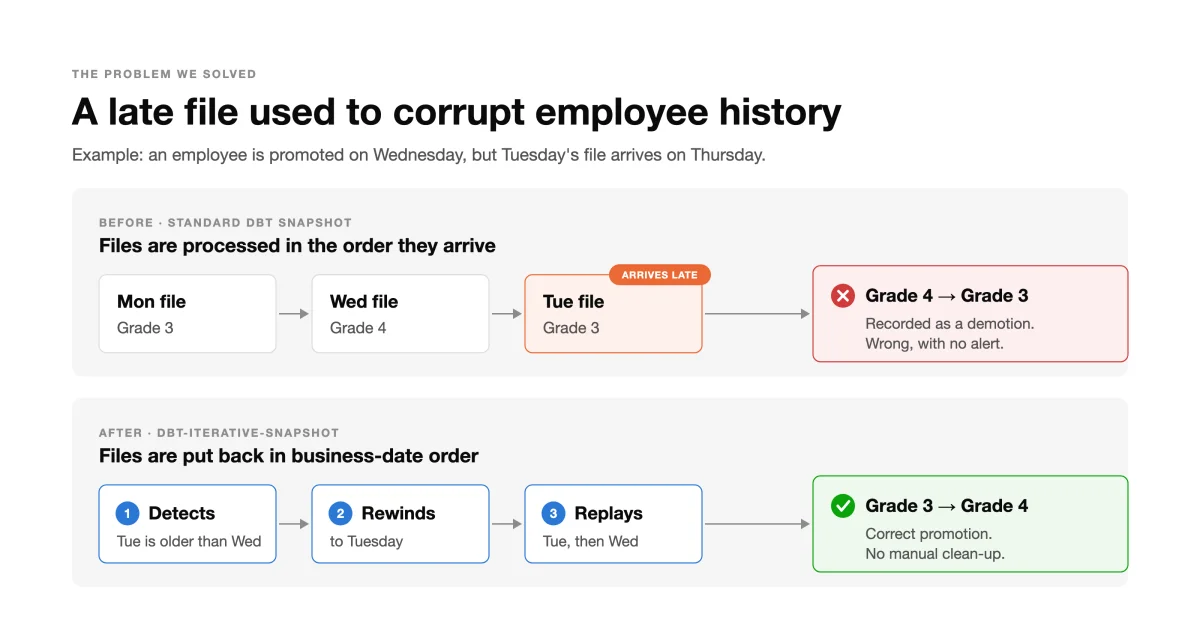
Top: files applied in arrival order record a demotion that never happened. Bottom: the late file is detected, history is rewound to Tuesday, and the files are replayed in business-date order.
Now imagine that history feeding a headcount report, a compensation review or an audit trail. Same pattern for a product’s price, a contract’s status or an account’s risk rating.
The dbt community has been circling this for years. dbt-core #7138 covers non-chronological inserts corrupting SCD2. #9892 asks for a way to backfill or rebase snapshots. #3878 is about snapshotting append-only tables. They describe the same underlying gap from three angles.
How to check whether this is already happening to you
Before reaching for any new tool, it’s worth finding out whether your existing snapshots are affected. If your snapshot is built on batch data and you kept the source system’s modification timestamp as a column, out-of-order application leaves a fingerprint: a newer version of a record carries an older source timestamp than the version before it.
-- Versions whose source timestamp goes backwards compared with the previous version.
-- Any rows returned are strong candidates for out-of-order batches.
select
  customer_id,
  status,
  modified_date,
  prev_modified_date,
  dbt_valid_from
from (
  select
    *,
    lag(modified_date) over (
      partition by customer_id
      order by dbt_valid_from
    ) as prev_modified_date
  from snapshots.customer_history
)
where modified_date < prev_modified_date
order by customer_id, dbt_valid_from;
This is a heuristic, not proof. It catches the check-strategy symptom. The timestamp-strategy symptom — a version that was dropped — leaves no trace in the snapshot at all; the only way to find it is to compare the snapshot against the raw batches. That asymmetry is part of why this problem is so persistent: the more “conservative” strategy hides the damage better.
The usual fixes, and what they cost
Teams that discover this tend to land on one of four workarounds. All of them work. None of them are free.
| Workaround | How it works | The catch |
|---|---|---|
| Manual rebuild | Delete the affected history and re-run batches one by one, e.g. looping dbt snapshot --vars over dates | Someone has to notice first. Repeated every time a file is late |
| Snapshot only the latest batch | Filter the source to max(batch_date) | Doesn’t help. The late batch is still the “latest” one when it finally arrives |
| Hand-written SCD2 in an incremental model | Custom MERGE logic with your own ordering rules | You now own every edge case: deletes, duplicates, schema changes, timeline repair |
| Full recompute from raw with window functions | Rebuild SCD2 from all batches with lag() on every run | Correct, but recomputes everything every run, and history older than raw retention is lost |
The full-recompute approach deserves credit — it’s deterministic and easy to reason about. It’s the right answer for small tables with unlimited raw retention. Most batch landing zones have a retention window, though, and once a file ages out, a full recompute quietly deletes the history built from it.
What we wanted was simpler to state: apply batches in business order, not arrival order, and repair the history automatically whenever a late batch shows up — without throwing away history that raw no longer holds.
dbt-iterative-snapshot: follow the order of the batches
dbt-iterative-snapshot is a dbt materialization for Databricks, published by Mercedes-Benz as open source under the MIT license and listed on the official dbt Package Hub. It keeps the familiar SCD2 output of dbt snapshots and adds one thing they don’t have: awareness of batch order.
The image at the top of this post shows the result: same three files, same late arrival. Applied in arrival order, Alice ends up Premium. Applied in business order, she ends up Gold — which is the truth.
The key idea is a single config value, sequence_by: the column that says which batch a row belongs to, such as batch_date or export_date. Instead of asking “what does the source look like now?”, the materialization asks “what changed from one batch to the next, in the order the batches actually happened?”
Two columns, two jobs:
| Column | Question it answers | Used for |
|---|---|---|
updated_at | When was this record modified in the source system? | dbt_valid_from / dbt_valid_to |
sequence_by | Which batch does this row belong to? | Processing order and late-batch detection |
A record modified on January 15th might arrive in the January 20th batch. That’s fine — updated_at keeps the business timestamp honest, while sequence_by decides the order in which batches are applied.
How it works: detect, roll back, replay
The whole mechanism is one decision, made on every run: is any new file older than a file I’ve already processed?
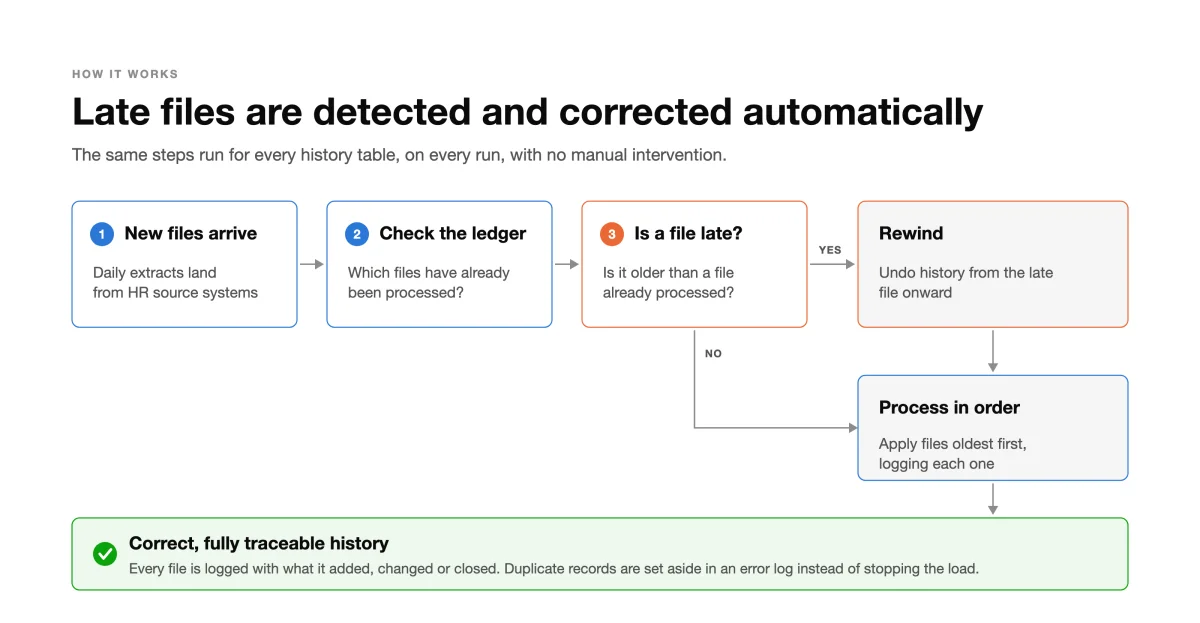
If the answer is no, batches are simply applied in order. If yes, history is rewound to the late file first. Either way, every file ends up logged in the ledger.
Your model selects every batch still retained in the raw layer, not just the newest one. That’s the part that feels unusual at first, and it’s what makes recovery possible. On every run, the materialization:
- Finds new batches by comparing the sequences in your query with an audit table of sequences it has already processed.
- Checks whether any of them is late, meaning its sequence is smaller than the largest one already processed.
- Rolls back the snapshot rows of every batch from the late one onward.
- Replays the late batch and all later batches in
sequence_byorder, one MERGE per batch, re-reading them from raw. - Logs each batch with its MERGE row counts and validates the SCD2 timeline so
dbt_valid_fromanddbt_valid_tostay consistent.
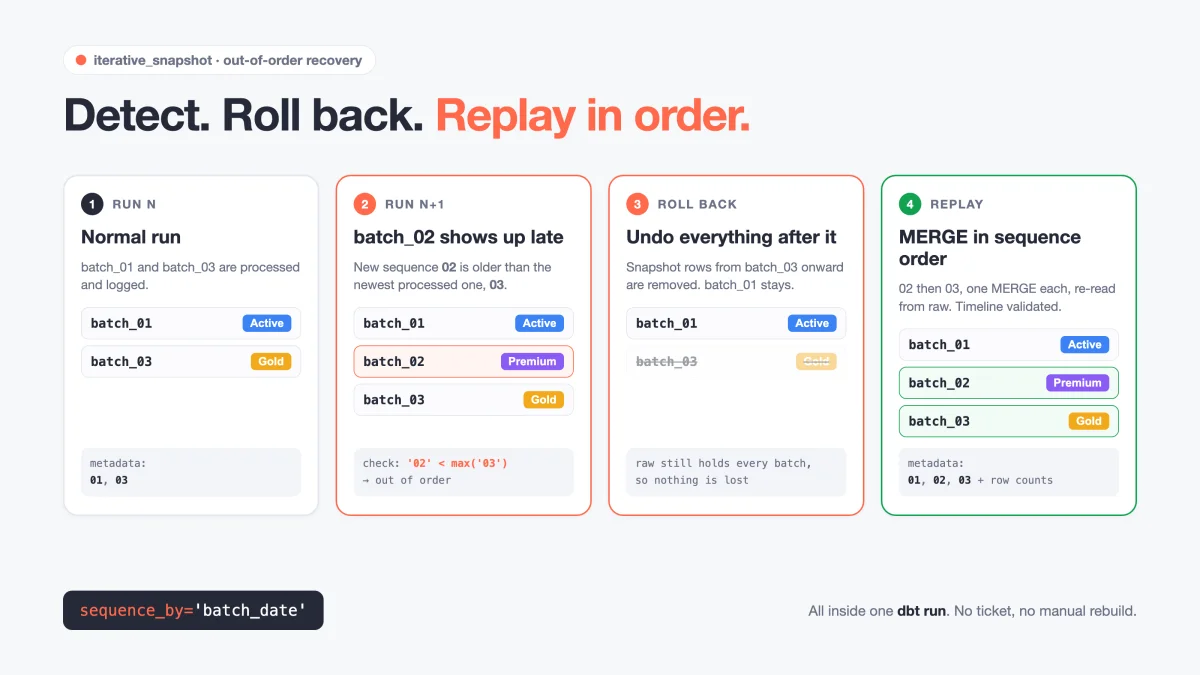
The late-batch check is a plain comparison: is the smallest incoming sequence lower than the maximum sequence in the audit table? If yes, everything from that point is rolled back and replayed. It all happens inside a normal dbt run.
Because batches are only ever applied one at a time and in order, each MERGE sees a clean “previous state” — the same guarantee a live-table snapshot gets for free, recreated for batch data.
Two details matter for production use:
- History outside raw retention is protected. If you track hard deletes, snapshot rows from later batches that are no longer in raw are backed up before the rollback and restored afterwards. A
--full-refreshfollows the same rule: it rebuilds from the raw data you still have and restores history for batches that have already aged out. - Recovery is observable. Every out-of-order recovery fires an
out_of_orderevent with the incoming and previously processed sequences. By default it’s logged; override one macro and it goes to Slack, email or an alerts table.
Getting started
1. Install from the dbt Package Hub
# packages.yml
packages:
  - package: mercedes-benz/dbt_iterative_snapshot
    version: [">=1.0.0", "<2.0.0"]
dbt deps2. Write a model
-- models/customer_history.sql
{{ config(
    materialized='iterative_snapshot',
    unique_key='customer_id',
    updated_at='modified_date',
    sequence_by='batch_date',
    strategy='check',
    check_cols=['name', 'email', 'status']
) }}

select customer_id, name, email, status, modified_date, batch_date
from {{ source('raw', 'customer_updates') }}
Note the absence of a where batch_date = ... filter. The query returns every batch still in raw; the materialization works out which ones are new.
3. Run it like any other model
dbt run --select customer_historyLater runs pick up only new batches. If one turns up late, the replay happens in the same command. There’s no separate backfill job and no runbook.
The metadata and error-log tables live in a schema of their own (default dbt_iterative_snapshot_metadata), which must exist before the first run. The requirements are dbt 1.9+ with dbt-databricks, and Databricks Runtime 15.3+ or a SQL warehouse.
What you get beyond correct ordering
Ordering is the headline, but the output also answers questions that standard snapshots leave to you.
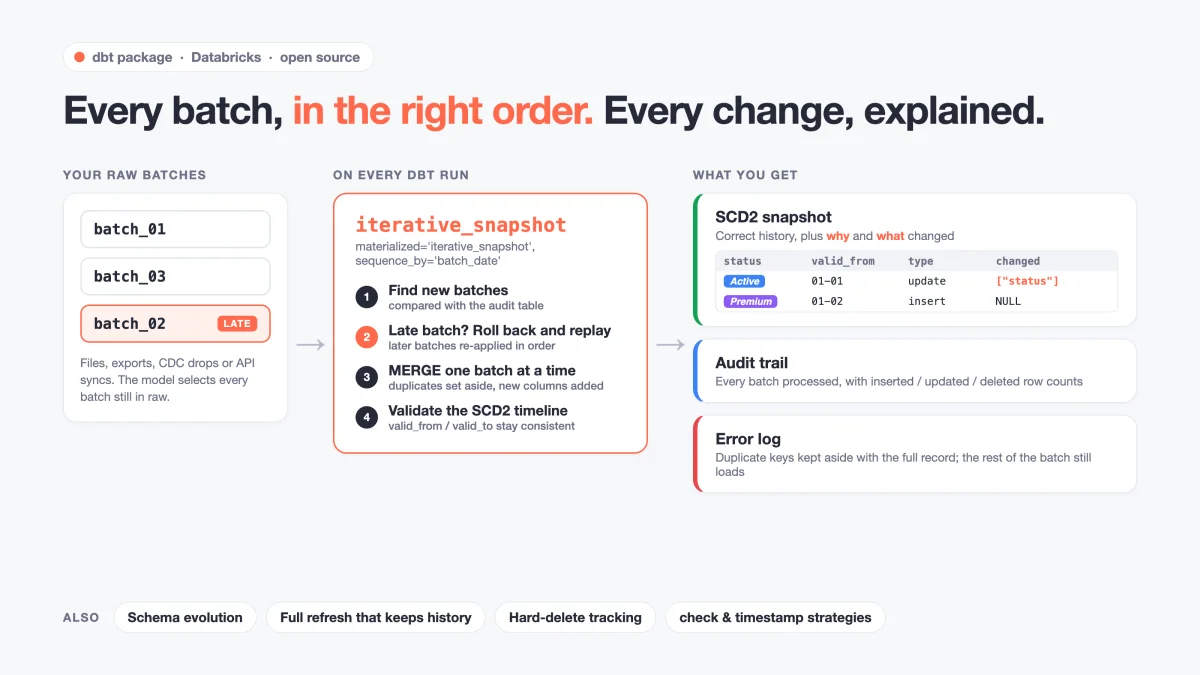
Raw batches in, correct history out, with an audit trail and an error log alongside.
“What changed?” is a column, not a query. Finding which field changed between two versions normally means a self-join or lag() over every tracked column. Here, every closed row already says why it was closed and what changed:
| customer_id | status | dbt_valid_from | dbt_valid_to | dbt_change_type | changed_attributes |
|---|---|---|---|---|---|
| 1 | Active | 2024-01-01 | 2024-01-02 | update | ["status"] |
| 1 | Premium | 2024-01-02 | NULL | insert | NULL |
dbt_change_type is update or delete (with hard-delete tracking on), and changed_attributes is a JSON array of the columns that changed.
“Did Tuesday’s file actually load?” is one query. Every processed batch is recorded with the run that processed it and its MERGE breakdown:
select sequence, run_started_at, num_inserted_rows, num_updated_rows, num_deleted_rows
from my_catalog.dbt_iterative_snapshot_metadata.iterative_snapshot_metadata
where model_name = 'customer_history'
order by sequence;
That distinguishes “the batch ran” from “the batch ran and wrote rows” — a difference that matters the first time a file arrives empty.
Duplicates don’t stop the run. If a batch contains the same key twice, all records for that key are set aside in an error log with the full record, a duplicate_records event fires, and the rest of the batch loads normally.
New columns are picked up. When the source adds a column, it’s added to the snapshot table automatically, and a schema_change event tells you about it.
Standard snapshot or iterative snapshot?
This is not a replacement for dbt snapshot. It’s a tool for a different shape of source.
| Your situation | Standard dbt snapshot | iterative_snapshot |
|---|---|---|
| Source is a live table you query once per run | Best fit | Not needed |
| Source arrives as batches: files, CDC, API extracts | Works only if order is guaranteed | Built for this |
| Batches can arrive late, be re-delivered or backfilled | Silently corrupts or drops history | Detects and replays |
| You need an audit trail of which batches loaded | Build it yourself | Included |
| You want to know which columns changed per version | Build it yourself | changed_attributes |
| You’re not on Databricks | Works everywhere | Not supported yet |
A useful rule of thumb: if you have ever written the phrase “re-run the snapshot for these dates” in a runbook or incident ticket, your source is batch-shaped and this problem has probably already happened at least once.
Where it falls short
Being honest about the limits is the fastest way to know whether this fits.
- dbt-databricks only, for now. The package relies on Delta Lake
MERGE, Unity Catalog and Databricks SQL functions. Snowflake, BigQuery, Postgres and other adapters are not supported today. The core idea — an audit table of processed sequences plus ordered, per-batch MERGEs — is not Databricks-specific, though, so adapter support is a contribution waiting to happen (see below). sequence_bymust sort correctly as a string. Processed sequences are stored and compared as strings. ISO dates and timestamps work. A plain integer batch ID does not:'10'sorts before'9'. Zero-pad it in the model (lpad(cast(batch_id as string), 12, '0')).- The model reads all retained batches. That’s what enables recovery, but it means the source query scans the whole raw retention window on every run. Temporary views (on by default) make sure the query is executed once rather than once per batch, and liquid clustering helps on large tables — but the scan is still real.
- Lateness has a cost. A batch that is one day late replays one day. A batch that is three months late replays three months of batches. Recovery is automatic, but it’s not free.
- Replay needs the raw data. Batches are re-read from raw during recovery. If your landing zone keeps only a few days of files, a batch that arrives later than that window can’t be replayed against the batches that already aged out.
- New engines aren’t verified yet. The package targets dbt Core 1.9+ and hasn’t been validated on dbt’s newer Fusion engine.
- Tested on our use cases. It runs in production for us, and the integration tests cover out-of-order data, both strategies and hard deletes. Your data will differ. Try it on a copy first.
Try it
If any of your SCD2 history is built from files, exports or CDC drops, run the self-check query above on one table first. It costs a few seconds and tells you whether this is theoretical for you or already in your dashboards.
Then give the package a spin:
- dbt Package Hub: hub.getdbt.com/mercedes-benz/dbt_iterative_snapshot
- GitHub: github.com/mercedes-benz/dbt-iterative-snapshot
- How it works, in depth: docs/HOW_IT_WORKS.md
# packages.yml -> - package: mercedes-benz/dbt_iterative_snapshot
dbt deps
dbt run --select customer_history
Adapter support: dbt-iterative-snapshot currently supports dbt-databricks only. If you run Snowflake, BigQuery, Postgres or another warehouse and want this for your stack, contributions are very welcome — open an issue to discuss the approach, or send a pull request that adds an adapter-specific implementation. dbt’s
adapter.dispatchpattern, which the package already uses for its event hook, is the natural place to start.
Issues, edge cases and pull requests are all welcome — especially the cases where it doesn’t fit yet.
If you find the package useful, please give it a star on GitHub. It’s a small click, but stars are how other data engineers with the same late-file problem discover the project — and how we know it’s worth investing in more adapters and features.
Related articles
- RAG Is Lying to You: The Data Pipeline Failures Hiding Behind Your LLM — more data failures that pass every check while producing wrong answers
- Snowflake and Databricks Converged on AI Agents in 2026 — where Databricks is heading as a platform
- Iceberg Built a Maze. DuckLake Just Handed You a Map. — table formats and why metadata design decides what you can repair later
Slowly changing dimensions come from Ralph Kimball’s dimensional modeling work, and the reasoning behind Type 2 history — what a version means, when it starts and ends — is still best explained at the source. The Data Warehouse Toolkit is the book to read if you want to design history tables that answer “as of” questions correctly.
Disclaimer: The author is the lead maintainer of dbt-iterative-snapshot, which is published as open source by Mercedes-Benz Group AG under the MIT license. Feature descriptions are based on the package’s v1.0.0 release and documentation as of October 30, 2026. The package currently supports the dbt-databricks adapter only; support for other adapters depends on community contributions. The behavior of standard dbt snapshots described here applies when the snapshot source is batch data loaded out of order; dbt snapshots behave correctly on the live-table sources they were designed for. The self-check query is a heuristic and can return false positives if source timestamps are themselves unreliable. This article contains affiliate links — purchasing through them supports this blog at no extra cost to you.

Comments
Loading comments...