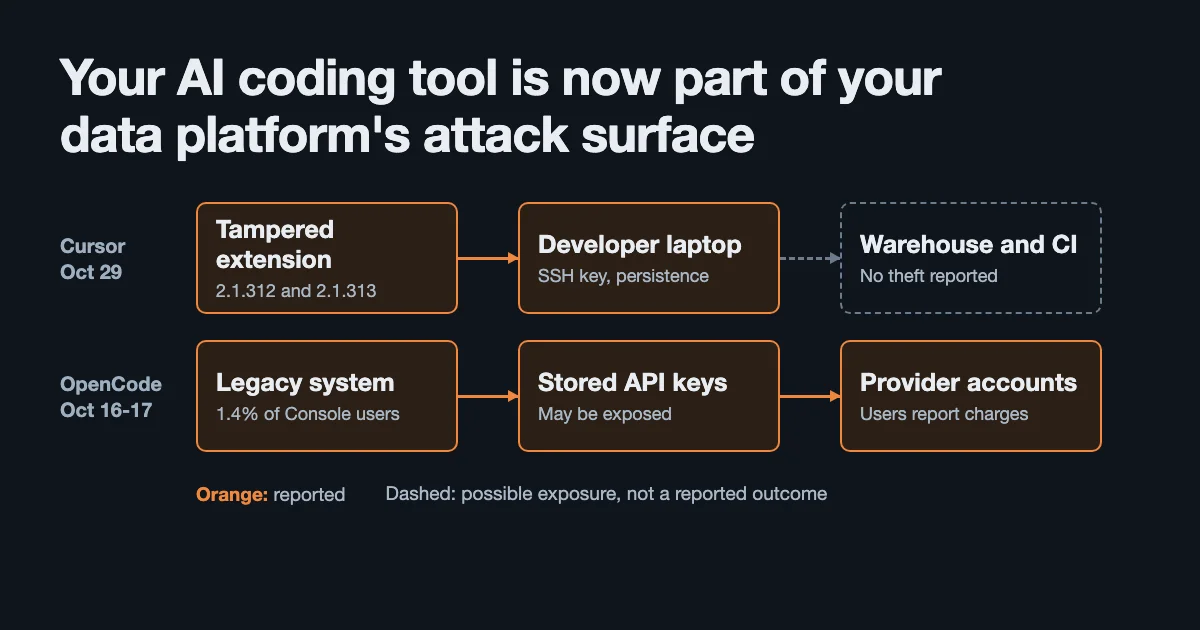
Two AI coding tool incidents in October hit from opposite directions: one through a hosted console that stored API keys, the other through an extension that ran on developer machines without a single prompt. If you write pipelines on a laptop that can reach production, here is what happened, what to check today and how to shrink the damage next time.
Twelve days, two very different breaches
On the night of October 16, developers started getting spend alerts they could not explain. By the next day, OpenCode had confirmed a breach of an older system behind its hosted console.
Twelve days later, on October 29, a tampered copy of the Claude Code extension appeared in Cursor’s extension marketplace. It stayed there for about 11 hours and tried to install a persistent SSH backdoor.
The two incidents have little in common technically, and that is what makes them useful together:
| OpenCode | Cursor marketplace | |
|---|---|---|
| Date | October 16-17 | October 29 |
| What was hit | A legacy system behind OpenCode Console | The extension distribution channel |
| Where the damage landed | Keys stored on the vendor’s side | Code running on the developer’s machine |
| Reported reach | 1.4% of Console users | Up to 5,000 users |
| Confirmed impact | Unauthorized AI charges reported by users | Attacker SSH key and persistence added, host details sent |
| Vendor’s first instruction | Revoke and replace provider keys | Remove the backdoor and rotate credentials |
One says the vendor holding your keys can fail. The other says the software on your own machine can turn against you overnight, with the name you already trust on the label.
Most teams still treat AI coding tools as editor plugins. Functionally, they are privileged software with access to source code, shells and whatever credentials the developer has. Data engineers should feel that more than most, because our laptops often have a direct line to the warehouse.
Inside the Cursor incident: 11 hours and a trusted name
Cursor’s notice puts the exposure window at about 2:27am to 1:35pm Pacific on October 29. The affected package was Anthropic.claude-code, versions 2.1.312 and 2.1.313, on macOS and Windows.
Phorion, the EDR vendor The Register credits with first spotting it, found code added to the top of the extension’s minified bundle. ThreatDefence adds a small forensic detail: the “2.1.313” package still reported version 2.1.312 internally. The higher number existed only in the repackaged manifest, which is a cheap way to make an update look routine.
According to Cursor’s notice and the two analyses, the payload did the following:
| Step | What it did |
|---|---|
| Recon | Collected hostname, username, OS, architecture, home directory, working directories, Git email and public IP |
| Credential map | Collected up to 40 environment variable names, not values, matching KEY, TOKEN, SECRET, PASS, AWS or GCP |
| Access | Added the attacker’s SSH key to authorized_keys |
| Persistence | Installed a LaunchAgent on macOS and a scheduled task or Startup script on Windows |
| Remote control | Attempted a reverse SSH tunnel to the attacker’s server, retrying about every 60 seconds |
Cursor says it removed the version, shut down the marketplace, audited access, rotated its keys and rebuilt the marketplace. It says no other extensions were tampered with, and that the attacker’s server no longer functions.
Anthropic’s Felix Rieseberg told The Register that “a malicious actor used access to Cursor’s marketplace to publish a tampered copy of the Claude Code extension, which we didn’t build or publish.” He added that Anthropic’s official channels were not affected.
No prompt required
This is the detail that matters most for anyone relying on agent permissions.
Phorion says the injected code “executes as soon as Node loads the file, before the extension’s normal activate callback even runs. The user doesn’t need to interact with the extension for the payload to fire.” ThreatDefence’s version is even shorter: it runs “without any Claude prompt.”
So approval prompts, allowlisted shell commands and carefully scoped agent permissions were never in play. Those controls govern what an agent asks to do. This code was not an agent decision. It was ordinary JavaScript running inside the editor’s extension process.
VS Code’s agent security documentation says this plainly:
“Extensions and MCP servers can operate on the user’s machine with broad access to the system. They can access all files on the local machine, execute arbitrary code…”
There are two different questions here, and it is easy to answer only the first:
| Question | Controls that answer it | Help against this attack? |
|---|---|---|
| What is the model allowed to do? | Permission modes, sandboxes, approval prompts | No |
| What is the software on this machine allowed to do? | OS permissions, EDR, extension policy, credential scope | Yes, these are the layers left |
A publisher allowlist would probably not have stopped it either. The tampered package carried the same Anthropic.claude-code identity developers would have approved, so trusting the name meant trusting the copy.
The backdoor was buggy. That was luck.
The easy version of this story says thousands of machines were taken over. The evidence does not support that.
Cursor says turning on the local SSH service “requires admin rights, which the malicious extension does not have on most macOS and Windows hosts.” Phorion found that on macOS the script misread a permissions error as “SSH is already on” and skipped the enable step. It also spotted what looks like a bug in the Windows path, which ThreatDefence calls the researchers’ reading of the code, not a confirmed result.
The result is a backdoor that often had no working door. Neither analysis reports confirmed credential theft or an operator actually logging in. ThreatDefence says it searched its customers’ telemetry for connections to the attacker’s server and found none.
Three things should stop you relaxing:
- Conditions can change. Phorion warns: “If the user already had Remote Login enabled, or turns it on later, the backdoor is ready and waiting.” Plenty of developers turn on SSH to reach their own machines.
- The bug was fixable. The attacker’s mistake is not a defense. The next version might not have it.
- “No evidence” has limits. Cursor says the limited environment collection “does not rule out later credential access over the backdoor.”
The environment variable step deserves a second look. Collecting names but not values looks restrained, but my reading is that a list of names is a shopping list. SNOWFLAKE_PRIVATE_KEY_PATH, DATABRICKS_TOKEN and AWS_SECRET_ACCESS_KEY tell an attacker which machines are worth the effort, without sending a single secret. No source I read states the attacker’s intent, so treat that as inference.
You can see your own list in one line:
# Prints names only. This is roughly what the beacon's filter would match.
env | cut -d= -f1 | grep -Ei 'KEY|TOKEN|SECRET|PASS|AWS|GCP' | head -40
An editor launched from the Dock or Start menu can have a different environment from your shell, so treat this as an approximation.
Inside the OpenCode breach: when the vendor holds the keys
OpenCode’s incident involved no malicious code on anyone’s laptop. OpenCode Console lets users link external AI providers. Its docs, as quoted by Elephas, describe the Console as storing the credential and serving each provider through its gateway. Attackers got into what OpenCode’s email called “a legacy system that we were in the process of decommissioning.”
OpenCode says the breach “impacted 1.4% of OpenCode Console users,” and that the affected group was a subset with external providers linked. No source gives an absolute number.
Co-founder Dax Raad drew the boundary clearly: “Note this is the OpenCode Console, not OpenCode itself, those keys never come to us.” The open source app and CLI were not part of this.
The costs were mostly on the providers’ side of the bill:
- TechCrunch reported user claims of charges in the hundreds of dollars, with a few above $1,000.
- BleepingComputer reported claims of more than $1,700 overnight, plus suspended Google Cloud projects.
- Elephas’s write-up quotes Anthropic staff saying affected Claude keys were revoked, OpenAI staff saying credits were being refunded, and Raad saying refunds were underway.
All of those amounts are user reports. OpenCode has not confirmed them or published a total.
The lesson for data teams has nothing to do with this particular vendor. Every “bring your own key” product is a small secrets manager you did not evaluate as one. A provider key pasted into a web console is exposed to that vendor’s oldest forgotten system, not only its newest one. The same applies to any SaaS tool holding a warehouse connection string.
Two details worth more attention than they got
OpenCode called it a distillation attack, and not everyone buys it. Its public statement said the breach was “related to a large-scale distillation attack,” meaning stolen access used to harvest model outputs at scale. TechCrunch notes that OpenCode did not specify how the distillation occurred and that some skeptics called the framing an overstretch. Elephas points out that the email sent to users never used the word. No one has publicly attributed the attack, so treat the label as a claim.
AI models refused during incident response. TechCrunch reports that the models OpenCode used for analysis “started refusing to work when the malicious code they were asked to examine activated safety filters.” Raad’s reaction: “that was a bit frustrating.” OpenCode later got access to OpenAI’s Daybreak Blue program, which gives vetted users models less likely to refuse defensive security work.
If your incident plan quietly assumes an AI assistant will help triage malware, test that assumption before you need it. A safety filter that only sees the payload may not be able to tell your forensic analysis from someone’s attack. Keep a route that doesn’t depend on it, whether that is a security vendor, a person or a model you have confirmed in advance.
Why this is a data platform problem
Neither incident has been linked to stolen warehouse credentials, and nothing here suggests your warehouse was touched. The point is about exposure: a typical data engineer’s laptop is a far more valuable target than a typical web developer’s.
These are common default locations. Your setup will vary, but this is the map an attacker with shell access would start from:
| Tool | Common location | What it can reach |
|---|---|---|
| AWS CLI | ~/.aws/credentials, ~/.aws/sso/cache/ | Data lake buckets, Glue, IAM |
| Google Cloud | ~/.config/gcloud/ | BigQuery, GCS |
| Databricks | ~/.databrickscfg, ~/.databricks/token-cache.json | Workspaces, jobs, Unity Catalog |
| Snowflake | ~/.snowflake/connections.toml, plus key files | Warehouses, shares, roles |
| dbt | ~/.dbt/profiles.yml | Whatever role your target uses |
| Kubernetes | ~/.kube/config | Airflow, Spark and other workloads |
| GitHub | ~/.ssh/, ~/.config/gh/ | Pipeline code and CI that deploys it |
| Projects | .env files in every repo | Anything |
The worst row may be the last one. Pipeline repos collect .env files with database passwords, and they are exactly the working directories a coding agent gets opened in.
The blast radius is also different from a web app’s. A stolen warehouse credential does not hand over one customer’s record. It hands over a query interface built for reading everything quickly, and bulk exports can look a lot like normal analytics work. That makes a human or service principal with a broad role the thing to fix first.
Check your machine today
If you or anyone on your team ran Cursor with the Claude Code extension around October 29, start here. These checks use indicators from Cursor’s notice.
macOS and Linux:
# The attacker's key is labelled svc-telemetry
grep -qs svc-telemetry ~/.ssh/authorized_keys && echo "FOUND: attacker SSH key"

# Persistence and marker files. Any output here needs investigating
ls -la ~/.config/.smt ~/.config/.smtk \
  ~/Library/LaunchAgents/com.apple.sysmond.plist 2>/dev/null

# Linux persistence appears as an @reboot cron entry
crontab -l 2>/dev/null | grep -F '.config/.smt'

# Was an affected version still installed?
ls ~/.cursor/extensions 2>/dev/null | grep -iE 'claude-code-2\.1\.31[23]'
The name com.apple.sysmond looks like an Apple system component. It isn’t one here, so don’t dismiss it on sight.
Windows (PowerShell):
Select-String -Pattern svc-telemetry -ErrorAction SilentlyContinue -Path `
  "$HOME\.ssh\authorized_keys", "C:\ProgramData\ssh\administrators_authorized_keys"

schtasks /query /tn SysMon
Test-Path "$HOME\.config\smt.cmd"
Test-Path "$env:APPDATA\Microsoft\Windows\Start Menu\Programs\Startup\sysmon.cmd"
On the network: search firewall, proxy or EDR logs for 134.209.82.225, on TCP 22 and TCP 8099. Phorion makes a useful distinction here: check whether a tunnel was merely established or whether an operator actually logged in through it.
These checks are a quick screen, not a clean bill of health. Cursor’s notice has the full indicator list, file hashes and remediation scripts for macOS and Windows. Read a script before running it, as you would any other.
If you find anything, updating or removing the extension is not enough. Sophos says that “uninstalling the extension leaves the backdoor in place,” and Cursor tells you to assess whether the host should be rebuilt. Work in this order:
- Isolate the machine.
- Preserve evidence and bring in your security team, if you have one.
- Remove the key, persistence and tunnel processes, or rebuild the machine.
- From a different, trusted machine, rotate credentials and sessions that were reachable from that host.
- Review warehouse and cloud audit logs for activity from that identity since October 29.
Step 4’s location matters. Rotating from a compromised machine can hand the new credentials straight to the attacker.
Rotation has its own traps. Snowflake’s docs note that for named key pairs, “by default, the prior key remains valid for 24 hours.” Databricks warns that “revoking consent doesn’t invalidate existing tokens” and that refresh tokens keep working until they expire. Confirm that the old credential has actually stopped working.
Shrink the blast radius before the next one
You cannot audit every extension update, and you cannot audit a vendor’s legacy systems. You can decide how much a compromised laptop or vendor is worth to an attacker.
| Change | What it limits | The catch |
|---|---|---|
| Short-lived credentials | How long a stolen token works | Refresh tokens need protecting too |
| Read-only dev roles, no production by default | What a stolen identity can read or change | More friction for production debugging |
No secrets in .env or plain environment variables | What a shell user finds immediately | Requires a secrets manager or OS keychain |
| Hard spend limits on AI provider keys | The size of the overnight bill | Can interrupt legitimate heavy runs |
| Separate keys per tool, never shared | How much one vendor breach costs you | More keys to manage |
| Delayed extension updates | Exposure to short-lived malicious releases | Also delays security fixes |
| Disposable dev containers | What the workspace can see | Doesn’t cover everything, and setup takes work |
A few specifics for data stacks:
Prefer OAuth over long-lived Databricks tokens. Databricks U2M OAuth access tokens are valid for one hour and refresh automatically. The token cache at ~/.databricks/token-cache.json is still a local file worth protecting, and the page doesn’t state a refresh token lifetime, so this narrows the window without closing it.
Use named, expiring Snowflake key pairs. Snowflake recommends registering a named key pair with ALTER USER ... ADD KEY PAIR, which supports role restriction and key expiration. Encrypt the private key. Snowflake is explicit that securing the file when it isn’t in use is your responsibility.
Treat an alert and a cap as different things. Elephas quotes OpenAI’s documentation that “spend alerts do not enforce a cap.” Several OpenCode victims learned about the problem from an alert, after the money was gone. Check what hard limits your provider offers.
Slow down extension updates on machines that can reach production. In VS Code, extensions.autoUpdate controls this, and extensions.allowed can restrict which extensions and versions may install. Confirm that your editor build honors them, since forks differ. An 11-hour window is short, and a delay of even a few days would have skipped this one entirely.
// settings.json: check support in your editor before relying on this
{
  "extensions.autoUpdate": false,
  "extensions.allowed": {
    "anthropic.claude-code": ["2.1.320"] // pin a version you have reviewed
  }
}
The version above is a placeholder. Pinning also means someone owns updating it, or you will trade this risk for missing real security fixes.
Where this argument falls short
Two incidents are not a trend line. They share a category, not a cause, a known attacker or a technique. I’m drawing a lesson about exposure, not claiming a coordinated campaign.
The data platform link is an inference. No source I read reports stolen warehouse, lakehouse or cloud data credentials from either incident. The credential table describes what was reachable in principle on a typical machine, not what was taken.
Important facts are still missing:
- Cursor has not said how the attacker got access to its marketplace.
- OpenCode has not said how attackers got in, how keys were stored or how many people are affected.
- The “up to 5,000” figure comes from Reuters’ reporting and Sophos. It does not appear in the Cursor notice as I read it.
- Sources disagree on some details. Phorion says the outbound tunnel could connect even without Remote Login enabled, while ThreatDefence says it could only connect where SSH was running. Sophos and The Register name only 2.1.313, while Cursor’s updated notice names both versions. Cursor lists Linux file paths among its indicators but scopes the affected builds to macOS and Windows.
The mitigations cost something. Short-lived credentials, restricted dev roles and delayed updates all add friction, and teams under deadline pressure will route around controls that hurt too much. Start with whichever one removes standing production access from laptops. That one is worth the complaints.
Try it
Give it 15 minutes this week:
# 1. Which credential names does your shell expose?
env | cut -d= -f1 | grep -Ei 'KEY|TOKEN|SECRET|PASS|AWS|GCP'

# 2. Which common credential files exist on this machine?
ls -la ~/.aws/credentials ~/.databrickscfg ~/.databricks/token-cache.json \
  ~/.snowflake/connections.toml ~/.dbt/profiles.yml ~/.kube/config 2>/dev/null

# 3. Which extensions can run on this machine, at which versions?
cursor --list-extensions --show-versions  # or: code --list-extensions --show-versions
Then ask one question about each file: if this machine were compromised tonight, what could this credential read by morning?
Further reading:
- Cursor: security notice with indicators and remediation scripts
- Phorion: technical analysis of the payload
- ThreatDefence: advisory and hunting guidance
- Sophos: X-Ops summary
- TechCrunch: OpenCode breach coverage
- VS Code: agent security documentation
Related articles
- Vibe Coding Is Great. Vibe Reviewing Is Terrifying. — the review gap that opens when agents write more of your code
- Your Data Stack Wasn’t Built for This: Architecting for AI Agents — what changes when agents become users of your data platform
- Claude Code Source Leak: 512K Lines Exposed via Missing .npmignore Entry — another case of AI tooling going wrong in the release pipeline
Security is one of the undercurrents that run through the whole data engineering lifecycle, not a final step you bolt on. Fundamentals of Data Engineering is a good place to see how access, credentials and least privilege fit into the way data systems are designed.
Disclaimer: This article is based on public statements and reporting from Cursor, Phorion, ThreatDefence, Sophos, The Register, Reuters, TechCrunch, BleepingComputer and Elephas, and on vendor documentation, as of November 3, 2026. Both incidents are recent and details may change. Loss amounts are user reports that OpenCode has not confirmed. The 5,000 figure is an upper estimate. Some OpenCode details come from Elephas, which sells a competing product, and security vendors cited here sell related services. The indicator checks are a quick screen and cannot prove a machine is clean, so follow vendor guidance and your security team for incident response. Credential paths are common defaults and vary by setup. The author has no affiliation with Cursor, OpenCode, Anthropic, Phorion, ThreatDefence or Sophos. This article contains affiliate links — purchasing through them supports this blog at no extra cost to you.


Comments
Loading comments...